Get your brand monitored in AI search results in under 10 minutes.
This guide walks you through the essential setup steps so you can start tracking your brand’s presence in AI-generated responses right away. By the end, you’ll have your first prompts running and your dashboard populating with real data.
1
Create your account and add your brand
When you first sign up for Citivus, the onboarding wizard guides you through setting up your brand profile.You’ll provide:
Brand name — The name of your brand as it appears publicly (e.g., “Tesla”, “Nike”, “Shopify”)
Brand website — Your brand’s primary URL (e.g., https://www.tesla.com)
Country — Your primary market location, which determines where AI prompts are run from
Individual vs. agency accounts — Currently, Citivus supports Individual accounts. Agency accounts with multi-client management are coming soon.
The system analyzes your website automatically to understand your brand, industry, and products. This powers the AI-generated prompt suggestions in the next step.
2
Select your prompts
After entering your brand details, Citivus analyzes your website and generates a list of strategic prompts — real questions that your potential customers are asking AI assistants.Review the suggested prompts and select the ones most relevant to your business. You need at least one prompt, but we recommend starting with 5-10 prompts for comprehensive coverage.Example prompts for an electric vehicle brand:
“Which electric vehicle is best for long range drive in USA?”
“What are the best EV to buy after federal tax credit has ended?”
“Best luxury electric SUV for families”
Don’t worry about getting them perfect right now. You can always add, modify, or remove prompts later from the Prompts Monitor page. Focus on picking prompts that represent the types of questions your ideal customers would ask an AI assistant.
You can also add custom prompts if the suggestions don’t cover a specific angle you’re interested in.
3
Review your brand snapshot
Once your prompts are selected, Citivus runs an initial analysis and generates a brand snapshot — a preview of your brand’s current position in AI search results.The snapshot shows you:
Total mentions — How many times your brand appeared across all prompts
Total citations — How many source URLs were cited in responses mentioning your brand
Industry ranking — How your brand ranks against auto-detected competitors
Top sources — Which domains AI assistants reference most often
Recent chats — A preview of actual AI responses with your brand’s mention status
Some metrics appear locked in the snapshot. This is by design — the full dashboard unlocks after you complete onboarding and your subscription activates.
4
Choose your plan
Citivus offers subscription plans with a 7-day free trial. Select the plan that matches your monitoring needs — you can always upgrade later.After selecting your plan, you’ll be redirected to a secure Stripe checkout to complete payment setup. Your trial begins immediately, and you won’t be charged until the trial period ends.
5
Explore your dashboard
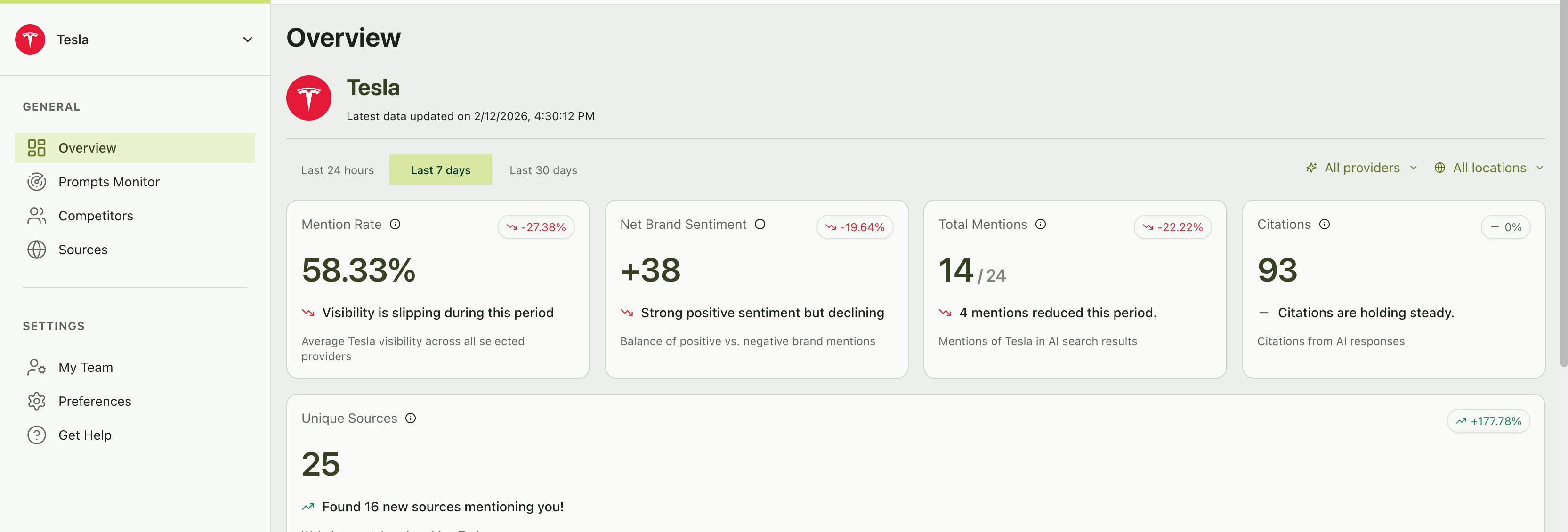
Once onboarding is complete, you’ll land on the Overview page — your brand’s command center.Key metrics at the top:
Metric
What it shows
Mention rate
% of AI responses that include your brand
Net brand sentiment
Balance of positive vs. negative mentions
Total mentions
Count of responses where your brand appeared
Citations
Total number of source citations across all responses
Unique sources
Number of distinct websites cited alongside your brand
The Overview dashboard with key metric cards and visibility charts
Below the metrics, you’ll find:
Visibility score chart — A time-series chart tracking your brand’s visibility alongside your competitors over time
Ranking table — A leaderboard comparing your brand to competitors by visibility score, change percentage, and net sentiment
AI providers performance — See which AI platforms mention you most
Prompt performance — Quickly identify your top-performing and underperforming prompts
Source breakdown — View which websites appear most frequently when your brand is mentioned
Now that you’re set up, dive deeper into each area:
Setting up your prompts
Learn how to craft effective prompts and manage your prompt library.
Identifying your competitors
Add competitors and understand the Emerging Threats feature.
Understanding your performance
Master the Overview dashboard and performance metrics.
Understanding sources
Discover which websites drive AI recommendations in your space.
Your prompts run automatically every day. Check back tomorrow to see your first full day of tracking data and watch your trends start forming.
Last modified on February 13, 2026
Was this page helpful?
⌘I
{"docsConfig":{"theme":"almond","$schema":"https://mintlify.com/docs.json","name":"Citivus Docs","description":"Learn how to track, measure, and optimize your brand's visibility across AI search platforms like ChatGPT, Perplexity, and Google AI Overview.","colors":{"primary":"#4D7C0F","light":"#4D7C0F","dark":"#BEF264"},"logo":{"light":"https://mintcdn.com/citivus/Z-ALmNf5MICCuw14/logo/light.png?fit=max\u0026auto=format\u0026n=Z-ALmNf5MICCuw14\u0026q=85\u0026s=9a639329dddd51b632b03221cd08f5c5","dark":"https://mintcdn.com/citivus/Z-ALmNf5MICCuw14/logo/dark.svg?fit=max\u0026auto=format\u0026n=Z-ALmNf5MICCuw14\u0026q=85\u0026s=60645a710216a14b954f16eeae9d712c","href":"https://citivus.com"},"favicon":"/favicon.svg","appearance":{"default":"system","strict":false},"background":{"decoration":"windows"},"navbar":{"links":[{"href":"mailto:help@citivus.com","label":"Contact us"}],"primary":{"type":"button","label":"My Dashboard","href":"https://citivus.app"}},"footer":{"socials":{"linkedin":"https://linkedin.com/company/citivus","website":"https://citivus.com"},"links":[{"header":"Product","items":[{"label":"Dashboard","href":"https://citivus.app"},{"label":"Website","href":"https://citivus.com"}]},{"header":"Resources","items":[{"label":"Guides","href":"/quickstart"},{"label":"Reference","href":"/reference/metrics-overview"}]},{"header":"Support","items":[{"label":"Contact us","href":"mailto:help@citivus.com"},{"label":"LinkedIn","href":"https://linkedin.com/company/citivus"}]}]},"search":{"prompt":"Search documentation..."},"seo":{"metatags":{"og:site_name":"Citivus Docs","og:title":"Citivus Docs — AI Search Analytics \u0026 Brand Monitoring","og:description":"Learn how to track, measure, and optimize your brand's visibility across AI search platforms like ChatGPT, Perplexity, and Google AI Overview.","og:locale":"en_US","twitter:title":"Citivus Docs — AI Search Analytics \u0026 Brand Monitoring","twitter:description":"Track your brand's presence in AI-generated search results. Monitor mentions, sentiment, and rankings across ChatGPT, Perplexity, and Google AI Overview.","twitter:card":"summary_large_image"},"indexing":"navigable"},"integrations":{"telemetry":{"enabled":true}},"errors":{"404":{"redirect":true,"title":"Page not found","description":"The page you're looking for doesn't exist or has been moved. Head back to the [documentation home](/) or use the search bar above."}},"contextual":{"options":["copy","view","chatgpt","claude","perplexity","mcp","cursor","vscode"],"display":"header"},"metadata":{"timestamp":true},"styling":{"latex":false},"navigation":{"global":{"anchors":[{"anchor":"Dashboard","icon":"arrow-up-right-from-square","href":"https://citivus.app"},{"anchor":"Contact Support","icon":"envelope","href":"mailto:help@citivus.com"}]},"pages":[]}},"deployment":{"deploymentMetadataValue":{"subdomain":"citivus","hasAudioNarration":false,"actualSubdomain":"citivus","customDomains":["docs.citivus.com"],"gitSource":{"type":"github","owner":"tarbits","repo":"citivus-docs","deployBranch":"main","contentDirectory":"","isPrivate":true,"mountPath":"","label":""},"chroma":{"liveDeploymentHistoryId":"6a21f6aca51a213e6e8af3f9","collectionId":"8c8db78d-f706-4b1c-863d-7b4e949ac2a0","schemaVersion":"v2"},"feedback":{"thumbs":true},"entitlements":{},"buildId":"6a21f6aca51a213e6e8af3f9:success","clientVersion":"0.0.3926","searchFilterCounts":[{"language":"default","tag":"Guides","count":10},{"language":"default","tag":"Reference","count":4},{"language":"default","tag":"Set up your project","count":3},{"language":"default","tag":"Interpret your results","count":3},{"language":"default","tag":"Manage your workspace","count":2},{"language":"default","tag":"Getting started","count":2}]},"assistantConfig":{"enableAskAiButton":false,"enableStarterQuestions":false,"enableAskAiSearchBar":true},"hasChatPermissions":false,"hasWebMcpPermissions":false,"toggles":[{"name":"kill-isr","enabled":true,"variant":{"name":"disabled","enabled":false,"feature_enabled":true},"impressionData":false},{"name":"agent-mintlify-slack","enabled":true,"variant":{"name":"disabled","enabled":false,"feature_enabled":true},"impressionData":false},{"name":"editor-v7-file-tree","enabled":true,"variant":{"name":"disabled","enabled":false,"feature_enabled":true},"impressionData":false},{"name":"agent-integrations-settings","enabled":true,"variant":{"name":"disabled","enabled":false,"feature_enabled":true},"impressionData":false},{"name":"automations-pr-grouping","enabled":true,"variant":{"name":"disabled","enabled":false,"feature_enabled":true},"impressionData":false},{"name":"custom-prefix","enabled":true,"variant":{"name":"disabled","enabled":false,"feature_enabled":true},"impressionData":false},{"name":"analytics-v7","enabled":true,"variant":{"name":"disabled","enabled":false,"feature_enabled":true},"impressionData":false},{"name":"user-flows-analytics","enabled":true,"variant":{"name":"disabled","enabled":false,"feature_enabled":true},"impressionData":false},{"name":"no-publish-flow","enabled":true,"variant":{"name":"disabled","enabled":false,"feature_enabled":true},"impressionData":false},{"name":"workos-onboarding","enabled":true,"variant":{"name":"disabled","enabled":false,"feature_enabled":true},"impressionData":false},{"name":"llms-txt-v2","enabled":true,"variant":{"name":"disabled","enabled":false,"feature_enabled":true},"impressionData":false},{"name":"pause-universal-search-reconcile","enabled":true,"variant":{"name":"disabled","enabled":false,"feature_enabled":true},"impressionData":false},{"name":"snapshot-serving-live","enabled":true,"variant":{"name":"disabled","enabled":false,"feature_enabled":true},"impressionData":false},{"name":"stripTemperatureMiddleware","enabled":true,"variant":{"name":"disabled","enabled":false,"feature_enabled":true},"impressionData":false},{"name":"per-site-search-delta","enabled":true,"variant":{"name":"disabled","enabled":false,"feature_enabled":true},"impressionData":false},{"name":"support-platform-pylon-zendesk","enabled":true,"variant":{"name":"disabled","enabled":false,"feature_enabled":true},"impressionData":false},{"name":"snapshot-serving","enabled":true,"variant":{"name":"disabled","enabled":false,"feature_enabled":true},"impressionData":false},{"name":"instant-rollback","enabled":true,"variant":{"name":"disabled","enabled":false,"feature_enabled":true},"impressionData":false},{"name":"granular-notifications-server","enabled":true,"variant":{"name":"disabled","enabled":false,"feature_enabled":true},"impressionData":false},{"name":"granular-notifications","enabled":true,"variant":{"name":"disabled","enabled":false,"feature_enabled":true},"impressionData":false},{"name":"editor-private-page-search","enabled":true,"variant":{"name":"disabled","enabled":false,"feature_enabled":true},"impressionData":false},{"name":"automations-fable","enabled":true,"variant":{"name":"disabled","enabled":false,"feature_enabled":true},"impressionData":false},{"name":"fixed-ai-action-pricing","enabled":true,"variant":{"name":"disabled","enabled":false,"feature_enabled":true},"impressionData":false},{"name":"automation-resolve-merge-conflict","enabled":true,"variant":{"name":"disabled","enabled":false,"feature_enabled":true},"impressionData":false},{"name":"scoped-publishing","enabled":true,"variant":{"name":"disabled","enabled":false,"feature_enabled":true},"impressionData":false},{"name":"mintql","enabled":true,"variant":{"name":"disabled","enabled":false,"feature_enabled":true},"impressionData":false},{"name":"page-level-analytics","enabled":true,"variant":{"name":"disabled","enabled":false,"feature_enabled":true},"impressionData":false},{"name":"editor-version-history-v2","enabled":true,"variant":{"name":"disabled","enabled":false,"feature_enabled":true},"impressionData":false},{"name":"editor-nav-generations","enabled":true,"variant":{"name":"disabled","enabled":false,"feature_enabled":true},"impressionData":false},{"name":"billing-page-v2","enabled":true,"variant":{"name":"disabled","enabled":false,"feature_enabled":true},"impressionData":false},{"name":"vite-origin","enabled":true,"variant":{"name":"disabled","enabled":false,"feature_enabled":true},"impressionData":false},{"name":"workspace-projects","enabled":true,"variant":{"name":"disabled","enabled":false,"feature_enabled":true},"impressionData":false},{"name":"assistant-v5","enabled":true,"variant":{"name":"disabled","enabled":false,"feature_enabled":true},"impressionData":false},{"name":"byok-sep-25","enabled":true,"variant":{"name":"disabled","enabled":false,"feature_enabled":true},"impressionData":false},{"name":"fork-pr-previews","enabled":true,"variant":{"name":"disabled","enabled":false,"feature_enabled":true},"impressionData":false},{"name":"revalidation-jwt","enabled":true,"variant":{"name":"disabled","enabled":false,"feature_enabled":true},"impressionData":false},{"name":"editor-agent-model-picker","enabled":true,"variant":{"name":"disabled","enabled":false,"feature_enabled":true},"impressionData":false},{"name":"hobby-abuse-scan","enabled":true,"variant":{"name":"disabled","enabled":false,"feature_enabled":true},"impressionData":false},{"name":"dashboard-inbox","enabled":true,"variant":{"name":"disabled","enabled":false,"feature_enabled":true},"impressionData":false}],"isAtlas":false,"googleFontsInlined":true},"customCss":[],"page":{"pagePath":"quickstart","slug":"/quickstart","pageMetadata":{"title":"Quickstart","description":"Get your brand monitored in AI search results in under 10 minutes.","icon":"rocket","href":"/quickstart","hidden":false},"description":{"compiledSource":"\"use strict\";\nconst {jsx: _jsx} = arguments[0];\nconst {useMDXComponents: _provideComponents} = arguments[0];\nfunction _createMdxContent(props) {\n const _components = {\n p: \"p\",\n ..._provideComponents(),\n ...props.components\n };\n return _jsx(_components.p, {\n children: \"Get your brand monitored in AI search results in under 10 minutes.\"\n });\n}\nfunction MDXContent(props = {}) {\n const {wrapper: MDXLayout} = {\n ..._provideComponents(),\n ...props.components\n };\n return MDXLayout ? _jsx(MDXLayout, {\n ...props,\n children: _jsx(_createMdxContent, {\n ...props\n })\n }) : _createMdxContent(props);\n}\nreturn {\n default: MDXContent\n};\n","frontmatter":{},"scope":{}},"pageType":"default","mdx":{"mdxSource":{"compiledSource":"\"use strict\";const{Fragment:_Fragment,jsx:_jsx,jsxs:_jsxs}=arguments[0];const{useMDXComponents:_provideComponents}=arguments[0];function _createMdxContent(props){const _components={code:`code`,li:`li`,p:`p`,strong:`strong`,tbody:`tbody`,td:`td`,th:`th`,thead:`thead`,tr:`tr`,ul:`ul`,..._provideComponents(),...props.components},{Card,CardGroup,Frame,Heading,Info,OptimizedImage,Step,Steps,Table,Tip}=_components;if(!Card)_missingMdxReference(`Card`,true);if(!CardGroup)_missingMdxReference(`CardGroup`,true);if(!Frame)_missingMdxReference(`Frame`,true);if(!Heading)_missingMdxReference(`Heading`,true);if(!Info)_missingMdxReference(`Info`,true);if(!OptimizedImage)_missingMdxReference(`OptimizedImage`,true);if(!Step)_missingMdxReference(`Step`,true);if(!Steps)_missingMdxReference(`Steps`,true);if(!Table)_missingMdxReference(`Table`,true);if(!Tip)_missingMdxReference(`Tip`,true);return _jsxs(_Fragment,{children:[_jsx(_components.p,{children:`This guide walks you through the essential setup steps so you can start tracking your brand’s presence in AI-generated responses right away. By the end, you’ll have your first prompts running and your dashboard populating with real data.`}),`\n`,_jsxs(Steps,{children:[_jsxs(Step,{title:`Create your account and add your brand`,children:[_jsx(_components.p,{children:`When you first sign up for Citivus, the onboarding wizard guides you through setting up your brand profile.`}),_jsx(_components.p,{children:`You’ll provide:`}),_jsxs(_components.ul,{children:[`\n`,_jsxs(_components.li,{children:[_jsx(_components.strong,{children:`Brand name`}),` — The name of your brand as it appears publicly (e.g., “Tesla”, “Nike”, “Shopify”)`]}),`\n`,_jsxs(_components.li,{children:[_jsx(_components.strong,{children:`Brand website`}),` — Your brand’s primary URL (e.g., `,_jsx(_components.code,{children:`https://www.tesla.com`}),`)`]}),`\n`,_jsxs(_components.li,{children:[_jsx(_components.strong,{children:`Country`}),` — Your primary market location, which determines where AI prompts are run from`]}),`\n`]}),_jsx(Info,{children:_jsxs(_components.p,{children:[_jsx(_components.strong,{children:`Individual vs. agency accounts`}),` — Currently, Citivus supports Individual accounts. Agency accounts with multi-client management are coming soon.`]})}),_jsx(_components.p,{children:`The system analyzes your website automatically to understand your brand, industry, and products. This powers the AI-generated prompt suggestions in the next step.`})]}),_jsxs(Step,{title:`Select your prompts`,children:[_jsxs(_components.p,{children:[`After entering your brand details, Citivus `,_jsx(_components.strong,{children:`analyzes your website`}),` and generates a list of strategic prompts — real questions that your potential customers are asking AI assistants.`]}),_jsxs(_components.p,{children:[`Review the suggested prompts and select the ones most relevant to your business. You need at least one prompt, but we recommend starting with `,_jsx(_components.strong,{children:`5-10 prompts`}),` for comprehensive coverage.`]}),_jsx(_components.p,{children:`Example prompts for an electric vehicle brand:`}),_jsxs(_components.ul,{children:[`\n`,_jsx(_components.li,{children:`“Which electric vehicle is best for long range drive in USA?”`}),`\n`,_jsx(_components.li,{children:`“What are the best EV to buy after federal tax credit has ended?”`}),`\n`,_jsx(_components.li,{children:`“Best luxury electric SUV for families”`}),`\n`]}),_jsx(Tip,{children:_jsx(_components.p,{children:`Don’t worry about getting them perfect right now. You can always add, modify, or remove prompts later from the Prompts Monitor page. Focus on picking prompts that represent the types of questions your ideal customers would ask an AI assistant.`})}),_jsxs(_components.p,{children:[`You can also `,_jsx(_components.strong,{children:`add custom prompts`}),` if the suggestions don’t cover a specific angle you’re interested in.`]})]}),_jsxs(Step,{title:`Review your brand snapshot`,children:[_jsxs(_components.p,{children:[`Once your prompts are selected, Citivus runs an initial analysis and generates a `,_jsx(_components.strong,{children:`brand snapshot`}),` — a preview of your brand’s current position in AI search results.`]}),_jsx(_components.p,{children:`The snapshot shows you:`}),_jsxs(_components.ul,{children:[`\n`,_jsxs(_components.li,{children:[_jsx(_components.strong,{children:`Total mentions`}),` — How many times your brand appeared across all prompts`]}),`\n`,_jsxs(_components.li,{children:[_jsx(_components.strong,{children:`Total citations`}),` — How many source URLs were cited in responses mentioning your brand`]}),`\n`,_jsxs(_components.li,{children:[_jsx(_components.strong,{children:`Industry ranking`}),` — How your brand ranks against auto-detected competitors`]}),`\n`,_jsxs(_components.li,{children:[_jsx(_components.strong,{children:`Top sources`}),` — Which domains AI assistants reference most often`]}),`\n`,_jsxs(_components.li,{children:[_jsx(_components.strong,{children:`Recent chats`}),` — A preview of actual AI responses with your brand’s mention status`]}),`\n`]}),_jsx(Info,{children:_jsx(_components.p,{children:`Some metrics appear locked in the snapshot. This is by design — the full dashboard unlocks after you complete onboarding and your subscription activates.`})})]}),_jsxs(Step,{title:`Choose your plan`,children:[_jsxs(_components.p,{children:[`Citivus offers subscription plans with a `,_jsx(_components.strong,{children:`7-day free trial`}),`. Select the plan that matches your monitoring needs — you can always upgrade later.`]}),_jsx(_components.p,{children:`After selecting your plan, you’ll be redirected to a secure Stripe checkout to complete payment setup. Your trial begins immediately, and you won’t be charged until the trial period ends.`})]}),_jsxs(Step,{title:`Explore your dashboard`,children:[_jsxs(_components.p,{children:[`Once onboarding is complete, you’ll land on the `,_jsx(_components.strong,{children:`Overview`}),` page — your brand’s command center.`]}),_jsx(_components.p,{children:_jsx(_components.strong,{children:`Key metrics at the top:`})}),_jsxs(Table,{children:[_jsx(_components.thead,{children:_jsxs(_components.tr,{children:[_jsx(_components.th,{children:`Metric`}),_jsx(_components.th,{children:`What it shows`})]})}),_jsxs(_components.tbody,{children:[_jsxs(_components.tr,{children:[_jsx(_components.td,{children:_jsx(_components.strong,{children:`Mention rate`})}),_jsx(_components.td,{children:`% of AI responses that include your brand`})]}),_jsxs(_components.tr,{children:[_jsx(_components.td,{children:_jsx(_components.strong,{children:`Net brand sentiment`})}),_jsx(_components.td,{children:`Balance of positive vs. negative mentions`})]}),_jsxs(_components.tr,{children:[_jsx(_components.td,{children:_jsx(_components.strong,{children:`Total mentions`})}),_jsx(_components.td,{children:`Count of responses where your brand appeared`})]}),_jsxs(_components.tr,{children:[_jsx(_components.td,{children:_jsx(_components.strong,{children:`Citations`})}),_jsx(_components.td,{children:`Total number of source citations across all responses`})]}),_jsxs(_components.tr,{children:[_jsx(_components.td,{children:_jsx(_components.strong,{children:`Unique sources`})}),_jsx(_components.td,{children:`Number of distinct websites cited alongside your brand`})]})]})]}),_jsx(Frame,{caption:`The Overview dashboard with key metric cards and visibility charts`,children:_jsx(OptimizedImage,{src:`https://mintcdn.com/citivus/Z-ALmNf5MICCuw14/images/overview-kpis.png?fit=max\u0026auto=format\u0026n=Z-ALmNf5MICCuw14\u0026q=85\u0026s=7871f5da802e5b4e21e83b6bc65198c5`,alt:`Overview dashboard showing metric cards for mention rate, net brand sentiment, total mentions, citations, and unique sources`,\"data-og-width\":`3330`,width:`3330`,\"data-og-height\":`1130`,height:`1130`,\"data-path\":`images/overview-kpis.png`,\"data-optimize\":`true`,\"data-opv\":`3`,srcset:`https://mintcdn.com/citivus/Z-ALmNf5MICCuw14/images/overview-kpis.png?w=280\u0026fit=max\u0026auto=format\u0026n=Z-ALmNf5MICCuw14\u0026q=85\u0026s=eb86e628c820b9c4ba49dc9d39608f55 280w, https://mintcdn.com/citivus/Z-ALmNf5MICCuw14/images/overview-kpis.png?w=560\u0026fit=max\u0026auto=format\u0026n=Z-ALmNf5MICCuw14\u0026q=85\u0026s=5444fe16552d92b0a861b0158e23006a 560w, https://mintcdn.com/citivus/Z-ALmNf5MICCuw14/images/overview-kpis.png?w=840\u0026fit=max\u0026auto=format\u0026n=Z-ALmNf5MICCuw14\u0026q=85\u0026s=52b7f5a94d8aabf9e295b0d2cd5d0539 840w, https://mintcdn.com/citivus/Z-ALmNf5MICCuw14/images/overview-kpis.png?w=1100\u0026fit=max\u0026auto=format\u0026n=Z-ALmNf5MICCuw14\u0026q=85\u0026s=2fc321bac31a22fdc5073151b27aa21a 1100w, https://mintcdn.com/citivus/Z-ALmNf5MICCuw14/images/overview-kpis.png?w=1650\u0026fit=max\u0026auto=format\u0026n=Z-ALmNf5MICCuw14\u0026q=85\u0026s=8fdc5591687273b2a08168e1965945c3 1650w, https://mintcdn.com/citivus/Z-ALmNf5MICCuw14/images/overview-kpis.png?w=2500\u0026fit=max\u0026auto=format\u0026n=Z-ALmNf5MICCuw14\u0026q=85\u0026s=b52aa901aa0cef9b19cc0df44dad8fe0 2500w`})}),_jsx(_components.p,{children:`Below the metrics, you’ll find:`}),_jsxs(_components.ul,{children:[`\n`,_jsxs(_components.li,{children:[_jsx(_components.strong,{children:`Visibility score chart`}),` — A time-series chart tracking your brand’s visibility alongside your competitors over time`]}),`\n`,_jsxs(_components.li,{children:[_jsx(_components.strong,{children:`Ranking table`}),` — A leaderboard comparing your brand to competitors by visibility score, change percentage, and net sentiment`]}),`\n`,_jsxs(_components.li,{children:[_jsx(_components.strong,{children:`AI providers performance`}),` — See which AI platforms mention you most`]}),`\n`,_jsxs(_components.li,{children:[_jsx(_components.strong,{children:`Prompt performance`}),` — Quickly identify your top-performing and underperforming prompts`]}),`\n`,_jsxs(_components.li,{children:[_jsx(_components.strong,{children:`Source breakdown`}),` — View which websites appear most frequently when your brand is mentioned`]}),`\n`]})]})]}),`\n`,_jsx(Heading,{level:`2`,id:`what’s-next`,children:`What’s next?`}),`\n`,_jsx(_components.p,{children:`Now that you’re set up, dive deeper into each area:`}),`\n`,_jsxs(CardGroup,{cols:2,children:[_jsx(Card,{title:`Setting up your prompts`,icon:`message-pen`,href:`/guides/setting-up-your-prompts`,children:_jsx(_components.p,{children:`Learn how to craft effective prompts and manage your prompt library.`})}),_jsx(Card,{title:`Identifying your competitors`,icon:`binoculars`,href:`/guides/identifying-your-competitors`,children:_jsx(_components.p,{children:`Add competitors and understand the Emerging Threats feature.`})}),_jsx(Card,{title:`Understanding your performance`,icon:`chart-line`,href:`/guides/understanding-your-performance`,children:_jsx(_components.p,{children:`Master the Overview dashboard and performance metrics.`})}),_jsx(Card,{title:`Understanding sources`,icon:`globe`,href:`/guides/understanding-sources`,children:_jsx(_components.p,{children:`Discover which websites drive AI recommendations in your space.`})})]}),`\n`,_jsx(Tip,{children:_jsx(_components.p,{children:`Your prompts run automatically every day. Check back tomorrow to see your first full day of tracking data and watch your trends start forming.`})})]})}function MDXContent(props={}){const{wrapper:MDXLayout}={..._provideComponents(),...props.components};return MDXLayout?_jsx(MDXLayout,{...props,children:_jsx(_createMdxContent,{...props})}):_createMdxContent(props)}return{default:MDXContent};function _missingMdxReference(id,component){throw new Error(`Expected `+(component?`component`:`object`)+\" `\"+id+\"` to be defined: you likely forgot to import, pass, or provide it.\")}","frontmatter":{},"scope":{"config":{},"pageMetadata":{"title":"Quickstart","description":"Get your brand monitored in AI search results in under 10 minutes.","icon":"rocket","href":"/quickstart","hidden":false}}},"mdxSourceWithNoJs":null},"mdxExtracts":{"tableOfContents":[{"title":"What’s next?","slug":"what’s-next","depth":2,"children":[]}],"codeExamples":{}},"jsLinks":[],"subdomain":"citivus","siteName":"Citivus Docs","title":"Citivus Docs — AI Search Analytics \u0026 Brand Monitoring","navMaps":{"firstHrefInVersion":{},"firstHrefInLanguage":{}},"lastModified":"2026-02-13T21:45:25.742Z","originalFileLocation":"quickstart.mdx"},"headHtml":"\u003cscript data-mint-head>(function(){var d=document.documentElement,p=null;if(!p){try{p=localStorage.getItem(\"isDarkMode\")}catch(e){}if(p==='true')p='dark';else if(p==='false')p='light';if(p!=='light'\u0026\u0026p!=='dark'\u0026\u0026p!=='system')p=\"system\"}var r=p==='system'?(matchMedia(\"(prefers-color-scheme: dark)\").matches?'dark':'light'):p;d.classList.remove(r==='dark'?'light':'dark');d.classList.add(r);d.setAttribute(\"data-theme-preference\",p)})();\u003c/script>\u003cmeta data-mint-head name=\"description\" content=\"Get your brand monitored in AI search results in under 10 minutes.\">\u003cmeta data-mint-head name=\"application-name\" content=\"Citivus Docs\">\u003cmeta data-mint-head name=\"generator\" content=\"Mintlify\">\u003clink data-mint-head rel=\"icon\" type=\"image/png\" sizes=\"192x192\" href=\"/mintlify-assets/_mintlify/favicons/citivus/FduBagRcq9EIp_jC/_generated/favicon/android-chrome-192x192.png\" media=\"(prefers-color-scheme: light)\">\u003clink data-mint-head rel=\"apple-touch-icon\" type=\"image/png\" sizes=\"180x180\" href=\"/mintlify-assets/_mintlify/favicons/citivus/FduBagRcq9EIp_jC/_generated/favicon/apple-touch-icon.png\">\u003clink data-mint-head rel=\"icon\" type=\"image/png\" sizes=\"16x16\" href=\"/mintlify-assets/_mintlify/favicons/citivus/FduBagRcq9EIp_jC/_generated/favicon/favicon-16x16.png\" media=\"(prefers-color-scheme: light)\">\u003clink data-mint-head rel=\"icon\" type=\"image/png\" sizes=\"32x32\" href=\"/mintlify-assets/_mintlify/favicons/citivus/FduBagRcq9EIp_jC/_generated/favicon/favicon-32x32.png\" media=\"(prefers-color-scheme: light)\">\u003clink data-mint-head rel=\"shortcut icon\" type=\"image/x-icon\" href=\"/mintlify-assets/_mintlify/favicons/citivus/FduBagRcq9EIp_jC/_generated/favicon/favicon.ico\" media=\"(prefers-color-scheme: light)\">\u003clink data-mint-head rel=\"icon\" type=\"image/png\" sizes=\"192x192\" href=\"/mintlify-assets/_mintlify/favicons/citivus/FduBagRcq9EIp_jC/_generated/favicon-dark/android-chrome-192x192.png\" media=\"(prefers-color-scheme: dark)\">\u003clink data-mint-head rel=\"icon\" type=\"image/png\" sizes=\"16x16\" href=\"/mintlify-assets/_mintlify/favicons/citivus/FduBagRcq9EIp_jC/_generated/favicon-dark/favicon-16x16.png\" media=\"(prefers-color-scheme: dark)\">\u003clink data-mint-head rel=\"icon\" type=\"image/png\" sizes=\"32x32\" href=\"/mintlify-assets/_mintlify/favicons/citivus/FduBagRcq9EIp_jC/_generated/favicon-dark/favicon-32x32.png\" media=\"(prefers-color-scheme: dark)\">\u003clink data-mint-head rel=\"shortcut icon\" type=\"image/x-icon\" href=\"/mintlify-assets/_mintlify/favicons/citivus/FduBagRcq9EIp_jC/_generated/favicon-dark/favicon.ico\" media=\"(prefers-color-scheme: dark)\">\u003cmeta data-mint-head property=\"og:title\" content=\"Citivus Docs — AI Search Analytics \u0026amp; Brand Monitoring\">\u003cmeta data-mint-head property=\"og:description\" content=\"Learn how to track, measure, and optimize your brand\u0026#x27;s visibility across AI search platforms like ChatGPT, Perplexity, and Google AI Overview.\">\u003cmeta data-mint-head property=\"og:site_name\" content=\"Citivus Docs\">\u003cmeta data-mint-head property=\"og:url\" content=\"https://docs.citivus.com/quickstart\">\u003cmeta data-mint-head property=\"og:type\" content=\"website\">\u003cmeta data-mint-head property=\"og:image\" content=\"https://citivus.mintlify.app/_mintlify/api/og/v2?division=Getting+started\u0026amp;title=Quickstart\u0026amp;description=Get+your+brand+monitored+in+AI+search+results+in+under+10+minutes.\u0026amp;theme=8e3338426f5f76bc82e23ae8\u0026amp;signature=bef500293ac8d51131f8abebb9e623728e26bc976e30d17ff60da3a05e2e4e7d\">\u003cmeta data-mint-head property=\"og:image:width\" content=\"1200\">\u003cmeta data-mint-head property=\"og:image:height\" content=\"630\">\u003cmeta data-mint-head name=\"twitter:card\" content=\"summary_large_image\">\u003cmeta data-mint-head name=\"twitter:title\" content=\"Citivus Docs — AI Search Analytics \u0026amp; Brand Monitoring\">\u003cmeta data-mint-head name=\"twitter:description\" content=\"Track your brand\u0026#x27;s presence in AI-generated search results. Monitor mentions, sentiment, and rankings across ChatGPT, Perplexity, and Google AI Overview.\">\u003cmeta data-mint-head name=\"twitter:image\" content=\"https://citivus.mintlify.app/_mintlify/api/og/v2?division=Getting+started\u0026amp;title=Quickstart\u0026amp;description=Get+your+brand+monitored+in+AI+search+results+in+under+10+minutes.\u0026amp;theme=8e3338426f5f76bc82e23ae8\u0026amp;signature=bef500293ac8d51131f8abebb9e623728e26bc976e30d17ff60da3a05e2e4e7d\">\u003cmeta data-mint-head name=\"twitter:image:width\" content=\"1200\">\u003cmeta data-mint-head name=\"twitter:image:height\" content=\"630\">\u003cmeta data-mint-head name=\"msapplication-config\" content=\"/mintlify-assets/_mintlify/favicons/citivus/FduBagRcq9EIp_jC/_generated/favicon/browserconfig.xml\">\u003cmeta data-mint-head name=\"apple-mobile-web-app-title\" content=\"Citivus Docs\">\u003cmeta data-mint-head name=\"msapplication-TileColor\" content=\"#4D7C0F\">\u003cmeta data-mint-head name=\"og:locale\" content=\"en_US\">\u003clink data-mint-head rel=\"canonical\" href=\"https://docs.citivus.com/quickstart\">\u003clink data-mint-head rel=\"alternate\" type=\"application/xml\" href=\"/sitemap.xml\">\u003clink data-mint-head rel=\"alternate\" type=\"text/markdown\" href=\"/quickstart.md\">\u003cscript data-mint-head type=\"application/ld+json\">{\"@context\":\"https://schema.org\",\"@graph\":[{\"@type\":\"Organization\",\"@id\":\"https://docs.citivus.com/#organization\",\"name\":\"Citivus Docs\",\"url\":\"https://docs.citivus.com\",\"logo\":{\"@type\":\"ImageObject\",\"url\":\"https://mintcdn.com/citivus/Z-ALmNf5MICCuw14/logo/light.png?fit=max\u0026auto=format\u0026n=Z-ALmNf5MICCuw14\u0026q=85\u0026s=9a639329dddd51b632b03221cd08f5c5\"}},{\"@type\":\"WebSite\",\"@id\":\"https://docs.citivus.com#website\",\"name\":\"Citivus Docs\",\"url\":\"https://docs.citivus.com\",\"publisher\":{\"@id\":\"https://docs.citivus.com/#organization\"}},{\"@type\":\"WebPage\",\"@id\":\"https://docs.citivus.com/quickstart#webpage\",\"url\":\"https://docs.citivus.com/quickstart\",\"name\":\"Quickstart\",\"description\":\"Get your brand monitored in AI search results in under 10 minutes.\",\"dateModified\":\"2026-02-13T21:45:25.742Z\",\"isPartOf\":{\"@id\":\"https://docs.citivus.com#website\"},\"breadcrumb\":{\"@id\":\"https://docs.citivus.com/quickstart#breadcrumb\"}},{\"@type\":\"BreadcrumbList\",\"@id\":\"https://docs.citivus.com/quickstart#breadcrumb\",\"itemListElement\":[{\"@type\":\"ListItem\",\"position\":1,\"name\":\"Getting started\",\"item\":\"https://docs.citivus.com/index\"},{\"@type\":\"ListItem\",\"position\":2,\"name\":\"Quickstart\",\"item\":\"https://docs.citivus.com/quickstart\"}]},{\"@type\":[\"Article\",\"TechArticle\"],\"@id\":\"https://docs.citivus.com/quickstart#article\",\"headline\":\"Quickstart\",\"name\":\"Quickstart\",\"description\":\"Get your brand monitored in AI search results in under 10 minutes.\",\"url\":\"https://docs.citivus.com/quickstart\",\"mainEntityOfPage\":{\"@id\":\"https://docs.citivus.com/quickstart#webpage\"},\"dateModified\":\"2026-02-13T21:45:25.742Z\",\"publisher\":{\"@id\":\"https://docs.citivus.com/#organization\"},\"isPartOf\":{\"@id\":\"https://docs.citivus.com#website\"}}]}\u003c/script>\u003cscript data-mint-head type=\"application/ld+json\">{\"@context\":\"https://schema.org\",\"@type\":\"WebSite\",\"name\":\"Citivus Docs\",\"creator\":{\"@type\":\"Organization\",\"name\":\"Mintlify\",\"url\":\"https://mintlify.com\"}}\u003c/script>","siteName":"Citivus Docs","nav":{"global":{"anchors":[{"anchor":"Dashboard","icon":"arrow-up-right-from-square","href":"https://citivus.app"},{"anchor":"Contact Support","icon":"envelope","href":"mailto:help@citivus.com"}]},"tabs":[{"tab":"Guides","icon":"book-open","groups":[{"group":"Getting started","pages":[{"title":"Welcome to Citivus","description":"Your brand's presence in AI search — tracked, measured, and optimized.","icon":"hand-wave","href":""},{"title":"Quickstart","icon":"rocket","href":"/quickstart"}]},{"group":"Set up your project","pages":[{"title":"Setting up your prompts","description":"Prompts are the questions your customers ask AI — and the foundation of everything Citivus tracks.","icon":"message-pen","href":"/guides/setting-up-your-prompts"},{"title":"Organizing your setup","icon":"folder-tree","href":"/guides/organizing-your-setup"},{"title":"Identifying your competitors","icon":"binoculars","href":"/guides/identifying-your-competitors"}]},{"group":"Interpret your results","pages":[{"title":"Understanding chats","icon":"messages","href":"/guides/understanding-chats"},{"title":"Understanding your performance","icon":"chart-line","href":"/guides/understanding-your-performance"},{"title":"Understanding sources","icon":"globe","href":"/guides/understanding-sources"}]},{"group":"Manage your workspace","pages":[{"title":"Team management","icon":"users","href":"/guides/team-management"},{"title":"Settings \u0026 preferences","icon":"gear","href":"/guides/settings"}]}]},{"tab":"Reference","icon":"book-bookmark","pages":[{"title":"Reference","href":"/reference/metrics-overview"}]}]},"title":"Citivus Docs — AI Search Analytics \u0026 Brand Monitoring","buildId":"dpl_9DauxEjb9gzCtcuhPQFbquJvx7FJ","deploymentId":"dpl_9DauxEjb9gzCtcuhPQFbquJvx7FJ","dynamics":["07c022d89b","a74be98ba7"],"chunks":["Frame-DpBmNN95.js","DynamicMarkdown-BY_qDhTn.js","zoom-image-lightbox-D4WcYaf4.js","PlusIcon-CwhPVjTe.js","lightbox-handle-r17bVUz3.js"]}