

Anatomy of a chat
Every chat in Citivus contains several pieces of information:Provider and location
Each chat comes from a specific AI provider (ChatGPT, Perplexity, or AI Overview) and was run from a specific geographic location (e.g., United States). The same prompt may produce different results across providers and locations.Mention status
The most fundamental data point — was your brand Mentioned or Not mentioned in this response?- Mentioned — Your brand appeared in the AI’s response. You’ll see your rank and citation details.
- Not mentioned — Your brand did not appear. This is valuable data too — it tells you which questions AI assistants aren’t associating with your brand.
Brand rank
When your brand is mentioned, Citivus records its position in the response. If the AI lists 5 products and yours is second, your rank is #2.Why rank matters — In AI responses, position drives attention. The first brand mentioned gets the most visibility and is often perceived as the “top recommendation.” Moving from #5 to #2 can dramatically increase how many users consider your brand.
Sentiment
Each mention carries a sentiment score — how positively or negatively the AI spoke about your brand in this specific response:- Positive — The AI highlighted strengths, made favorable comparisons, or recommended your brand
- Neutral — The AI mentioned your brand factually without strong positive or negative framing
- Negative — The AI mentioned drawbacks, criticisms, or unfavorable comparisons
Citations
The sources that the AI provider cited in its response. These are the websites and URLs the AI referenced to support its answer. Citations tell you which content is influencing AI recommendations.Where to find chats
On the prompt detail page
Navigate to Prompts Monitor > click any prompt > scroll down to the Recent Insights section. Here you’ll see chats organized by date, with expandable sections for each day.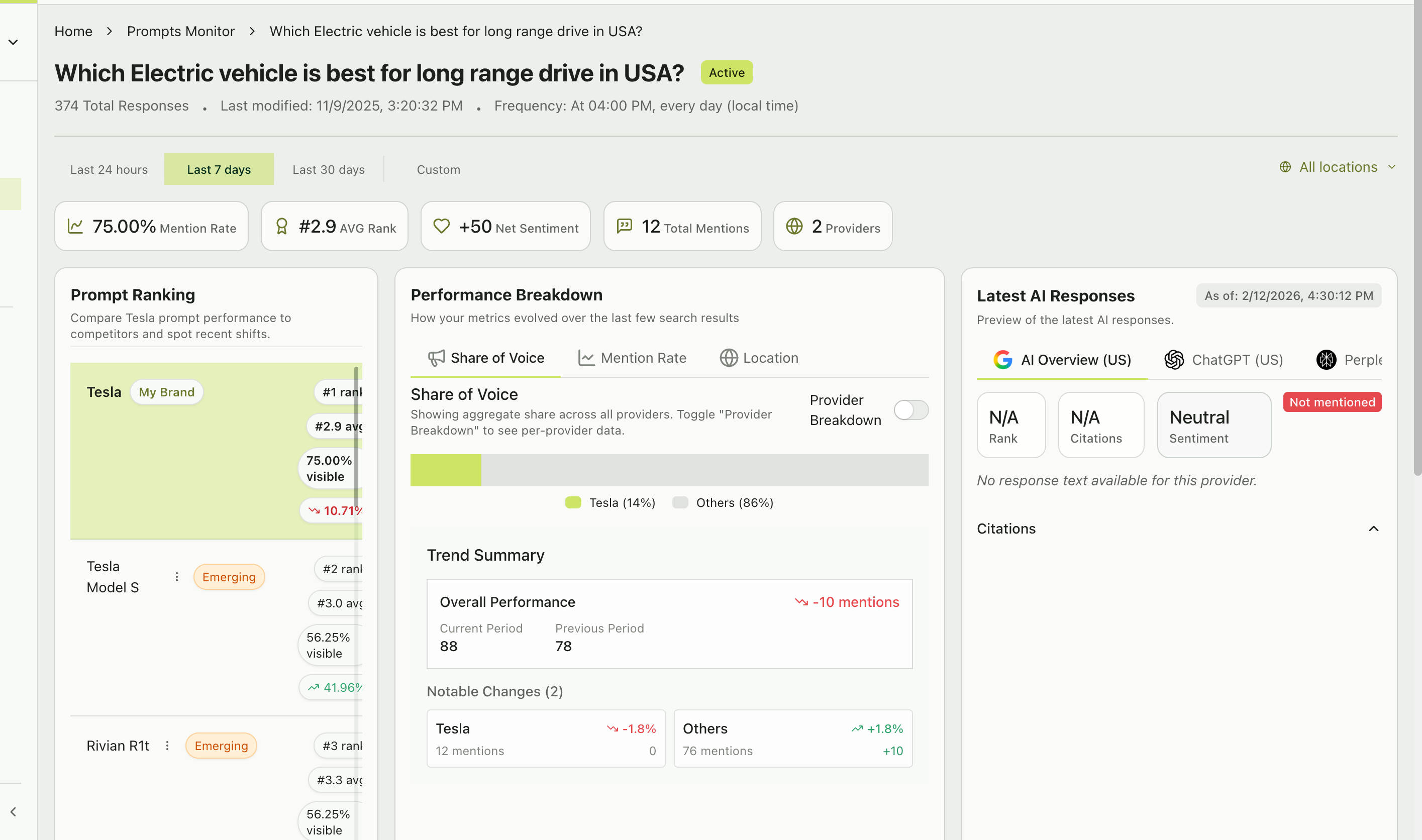
Prompt detail page showing ranking, performance breakdown, and latest AI responses
Chat cards
Each chat card shows:- Provider icon and name (e.g., ChatGPT, Perplexity, AI Overview)
- Timestamp and location (e.g., “04:00 PM - United States”)
- Mention status — “Mentioned” with a green indicator or “Not mentioned” with a gray indicator
- Rank badge (if mentioned) — Shows your brand’s position (e.g., “#2”)
- Citation count — Number of sources cited (e.g., “2 citations”)
- Response preview — A blockquote showing the beginning of the AI’s response text
- Source links — Clickable links to the cited URLs
Latest AI responses
At the top of the prompt detail page, the Latest AI Responses section provides a tabbed view showing the most recent response from each provider:- AI Overview (US)
- ChatGPT (US)
- Perplexity (US)
Google’s AI-generated summary — concise, focused responses that may or may not mention specific brands.
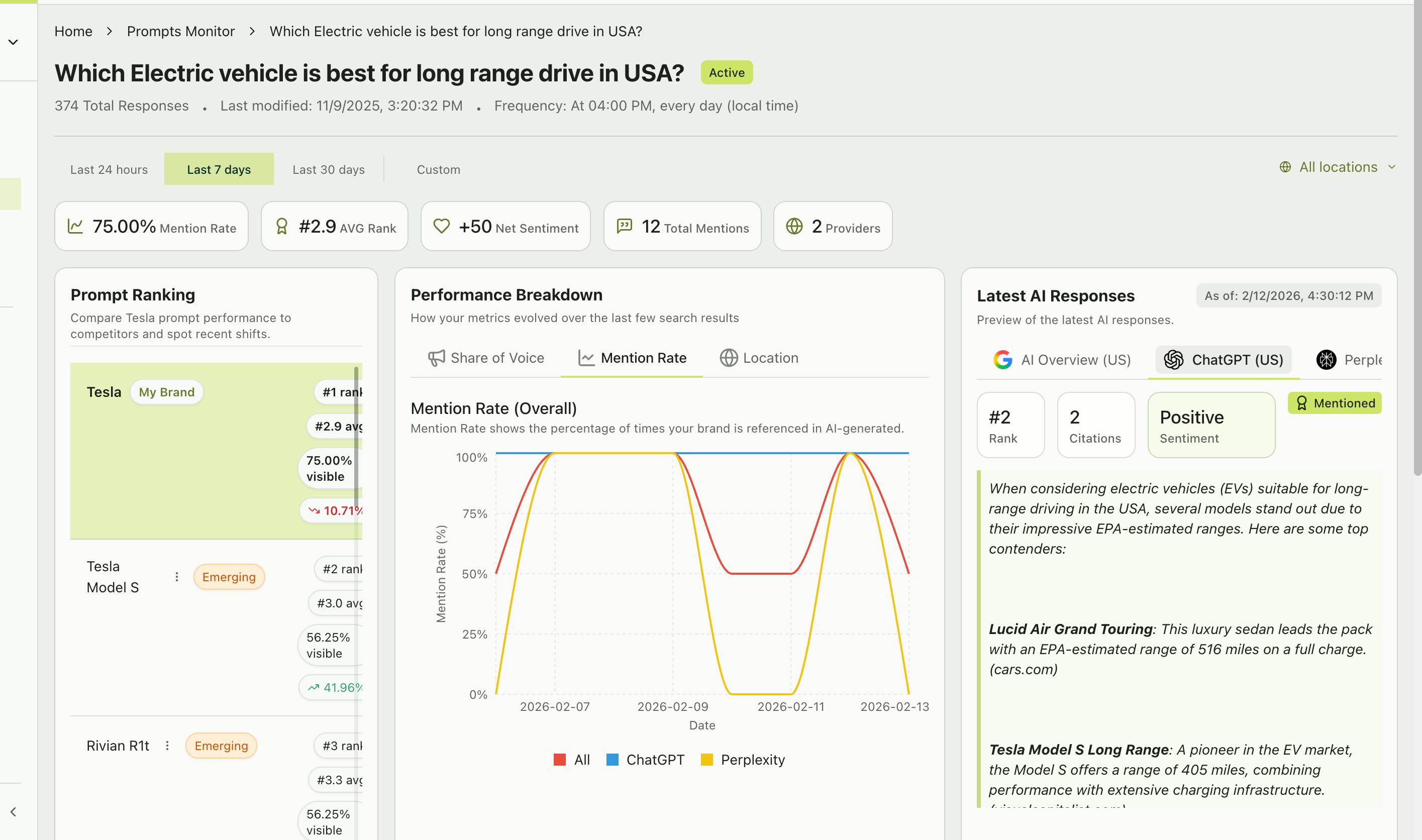
A ChatGPT response showing brand mentions, citations, and the full AI-generated answer
How different AI providers behave
Not all AI providers generate responses the same way. Understanding these differences helps you interpret your chats more effectively:ChatGPT
ChatGPT
- Tends to produce narrative-style responses with ordered lists of recommendations
- Often includes detailed pros/cons for each brand mentioned
- Citation behavior varies — some responses cite sources, others don’t
- Ranks tend to be more stable day-to-day
Perplexity
Perplexity
- Always cites sources — every response includes linked references
- Produces more research-oriented responses with supporting data
- May mention more brands in a single response
- Source quality and recency tend to be higher
AI Overview (Google)
AI Overview (Google)
- Generates concise summary-style responses at the top of Google search results
- May or may not mention specific brands depending on the query
- Citation behavior is tied to Google’s search index
- Responses tend to be shorter and more focused
“N/A” in AI Overview — Sometimes AI Overview shows “N/A” for rank and citations. This means Google didn’t generate an AI Overview for that particular query at that time. This is normal — not all queries trigger AI Overviews.
Reading chat position rankings
On the prompt detail page, the Prompt Ranking section shows how your brand compares to all brands mentioned in responses for this specific prompt:
Brands you’re not tracking as competitors may appear here with an “Emerging” badge — these are candidates for your Emerging Threats list.
What to look for in your chats
Consistent #1 ranking
Your brand is the top recommendation. Protect this position.
Declining rank
You’re sliding down the list. Check what competitors are doing differently.
Not mentioned, but competitors are
A content gap. The AI doesn’t associate your brand with this topic yet.
Negative sentiment
The AI is highlighting drawbacks. Address these in your content and PR.