> ## Documentation Index
> Fetch the complete documentation index at: https://docs.citivus.com/llms.txt
> Use this file to discover all available pages before exploring further.
# Understanding chats
> Every AI response is a 'chat' — and each one tells a story about your brand's position.
In Citivus, a **chat** is a single AI-generated response to one of your monitored prompts. Each time Citivus sends a prompt to ChatGPT, Perplexity, or AI Overview, the response that comes back is recorded as a chat. Understanding how to read these chats is key to extracting actionable insights.
## Anatomy of a chat
Every chat in Citivus contains several pieces of information:
### Provider and location
Each chat comes from a specific **AI provider** (ChatGPT, Perplexity, or AI Overview) and was run from a specific **geographic location** (e.g., United States). The same prompt may produce different results across providers and locations.
### Mention status
The most fundamental data point — was your brand **Mentioned** or **Not mentioned** in this response?
* **Mentioned** — Your brand appeared in the AI's response. You'll see your rank and citation details.
* **Not mentioned** — Your brand did not appear. This is valuable data too — it tells you which questions AI assistants aren't associating with your brand.
### Brand rank
When your brand is mentioned, Citivus records its **position** in the response. If the AI lists 5 products and yours is second, your rank is **#2**.
**Why rank matters** — In AI responses, position drives attention. The first brand mentioned gets the most visibility and is often perceived as the "top recommendation." Moving from #5 to #2 can dramatically increase how many users consider your brand.
### Sentiment
Each mention carries a **sentiment score** — how positively or negatively the AI spoke about your brand in this specific response:
* **Positive** — The AI highlighted strengths, made favorable comparisons, or recommended your brand
* **Neutral** — The AI mentioned your brand factually without strong positive or negative framing
* **Negative** — The AI mentioned drawbacks, criticisms, or unfavorable comparisons
### Citations
The **sources** that the AI provider cited in its response. These are the websites and URLs the AI referenced to support its answer. Citations tell you which content is influencing AI recommendations.
## Where to find chats
### On the prompt detail page
Navigate to **Prompts Monitor** > click any prompt > scroll down to the **Recent Insights** section. Here you'll see chats organized by date, with expandable sections for each day.
 Each daily section shows the number of responses collected that day (e.g., "3 responses" — one per provider). Click **"Expand All"** or **"Collapse All"** to control the view.
### Chat cards
Each chat card shows:
1. **Provider icon and name** (e.g., ChatGPT, Perplexity, AI Overview)
2. **Timestamp and location** (e.g., "04:00 PM - United States")
3. **Mention status** — "Mentioned" with a green indicator or "Not mentioned" with a gray indicator
4. **Rank badge** (if mentioned) — Shows your brand's position (e.g., "#2")
5. **Citation count** — Number of sources cited (e.g., "2 citations")
6. **Response preview** — A blockquote showing the beginning of the AI's response text
7. **Source links** — Clickable links to the cited URLs
Click **"View Details"** on any chat card to see the complete response text and full analysis.
## Latest AI responses
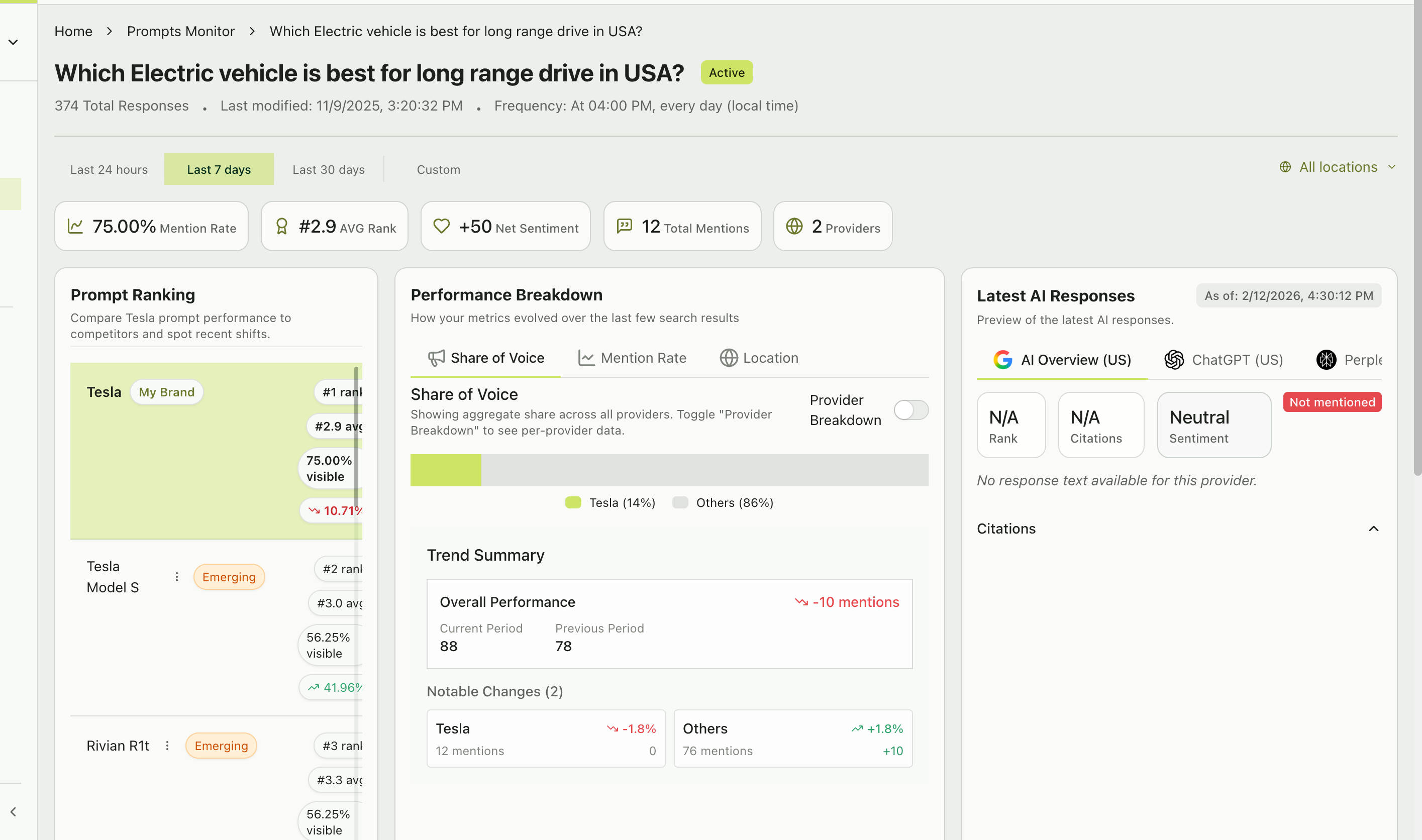
At the top of the prompt detail page, the **Latest AI Responses** section provides a tabbed view showing the most recent response from each provider:
Google's AI-generated summary — concise, focused responses that may or may not mention specific brands.
OpenAI's response — narrative-style with ordered lists and detailed pros/cons.
Perplexity's search-augmented response — always includes cited sources and references.
Each tab shows the rank, citation count, sentiment, mention status, and the full response text for that provider's latest run.
Each daily section shows the number of responses collected that day (e.g., "3 responses" — one per provider). Click **"Expand All"** or **"Collapse All"** to control the view.
### Chat cards
Each chat card shows:
1. **Provider icon and name** (e.g., ChatGPT, Perplexity, AI Overview)
2. **Timestamp and location** (e.g., "04:00 PM - United States")
3. **Mention status** — "Mentioned" with a green indicator or "Not mentioned" with a gray indicator
4. **Rank badge** (if mentioned) — Shows your brand's position (e.g., "#2")
5. **Citation count** — Number of sources cited (e.g., "2 citations")
6. **Response preview** — A blockquote showing the beginning of the AI's response text
7. **Source links** — Clickable links to the cited URLs
Click **"View Details"** on any chat card to see the complete response text and full analysis.
## Latest AI responses
At the top of the prompt detail page, the **Latest AI Responses** section provides a tabbed view showing the most recent response from each provider:
Google's AI-generated summary — concise, focused responses that may or may not mention specific brands.
OpenAI's response — narrative-style with ordered lists and detailed pros/cons.
Perplexity's search-augmented response — always includes cited sources and references.
Each tab shows the rank, citation count, sentiment, mention status, and the full response text for that provider's latest run.
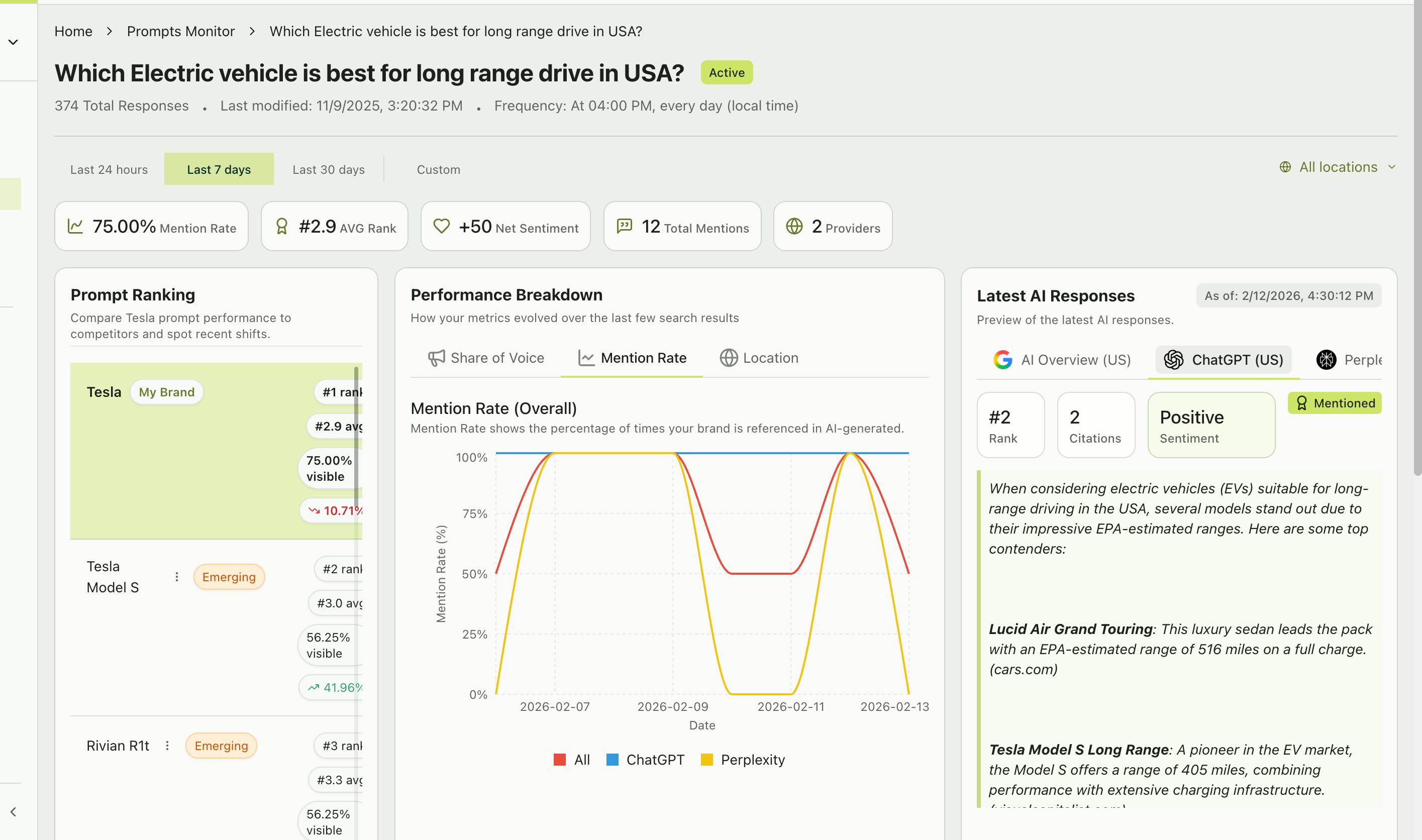 Compare the same prompt across providers. You'll often find that one provider is more favorable to your brand than others. This can inform where you focus your content optimization efforts.
## How different AI providers behave
Not all AI providers generate responses the same way. Understanding these differences helps you interpret your chats more effectively:
* Tends to produce **narrative-style responses** with ordered lists of recommendations
* Often includes detailed pros/cons for each brand mentioned
* Citation behavior varies — some responses cite sources, others don't
* Ranks tend to be more stable day-to-day
* Always **cites sources** — every response includes linked references
* Produces more research-oriented responses with supporting data
* May mention more brands in a single response
* Source quality and recency tend to be higher
* Generates concise **summary-style responses** at the top of Google search results
* May or may not mention specific brands depending on the query
* Citation behavior is tied to Google's search index
* Responses tend to be shorter and more focused
**"N/A" in AI Overview** — Sometimes AI Overview shows "N/A" for rank and citations. This means Google didn't generate an AI Overview for that particular query at that time. This is normal — not all queries trigger AI Overviews.
## Reading chat position rankings
On the prompt detail page, the **Prompt Ranking** section shows how your brand compares to all brands mentioned in responses for this specific prompt:
| Column | What it shows |
| ----------- | ------------------------------------------------------------------------------- |
| **Brand** | The brand name (your brand is labeled "My Brand") |
| **Rank** | Your position (e.g., "#1 rank") — the best single-response position achieved |
| **Avg** | Average rank across all responses (e.g., "#2.9 avg") |
| **Visible** | Percentage of responses where this brand was mentioned (e.g., "75.00% visible") |
| **Change** | Percentage change in visibility compared to the previous period |
Brands you're not tracking as competitors may appear here with an **"Emerging"** badge — these are candidates for your Emerging Threats list.
## What to look for in your chats
Your brand is the top recommendation. Protect this position.
You're sliding down the list. Check what competitors are doing differently.
A content gap. The AI doesn't associate your brand with this topic yet.
The AI is highlighting drawbacks. Address these in your content and PR.
Compare the same prompt across providers. You'll often find that one provider is more favorable to your brand than others. This can inform where you focus your content optimization efforts.
## How different AI providers behave
Not all AI providers generate responses the same way. Understanding these differences helps you interpret your chats more effectively:
* Tends to produce **narrative-style responses** with ordered lists of recommendations
* Often includes detailed pros/cons for each brand mentioned
* Citation behavior varies — some responses cite sources, others don't
* Ranks tend to be more stable day-to-day
* Always **cites sources** — every response includes linked references
* Produces more research-oriented responses with supporting data
* May mention more brands in a single response
* Source quality and recency tend to be higher
* Generates concise **summary-style responses** at the top of Google search results
* May or may not mention specific brands depending on the query
* Citation behavior is tied to Google's search index
* Responses tend to be shorter and more focused
**"N/A" in AI Overview** — Sometimes AI Overview shows "N/A" for rank and citations. This means Google didn't generate an AI Overview for that particular query at that time. This is normal — not all queries trigger AI Overviews.
## Reading chat position rankings
On the prompt detail page, the **Prompt Ranking** section shows how your brand compares to all brands mentioned in responses for this specific prompt:
| Column | What it shows |
| ----------- | ------------------------------------------------------------------------------- |
| **Brand** | The brand name (your brand is labeled "My Brand") |
| **Rank** | Your position (e.g., "#1 rank") — the best single-response position achieved |
| **Avg** | Average rank across all responses (e.g., "#2.9 avg") |
| **Visible** | Percentage of responses where this brand was mentioned (e.g., "75.00% visible") |
| **Change** | Percentage change in visibility compared to the previous period |
Brands you're not tracking as competitors may appear here with an **"Emerging"** badge — these are candidates for your Emerging Threats list.
## What to look for in your chats
Your brand is the top recommendation. Protect this position.
You're sliding down the list. Check what competitors are doing differently.
A content gap. The AI doesn't associate your brand with this topic yet.
The AI is highlighting drawbacks. Address these in your content and PR.